Managing your subscribers
Search, filter, edit, tag, unsubscribe, export, and delete subscribers in TinyCourier, including bulk actions for handling many at once.
Your Subscribers page is home base for everyone on your list. Here’s how to find and manage people.
Finding people
- Search by email or name using the search box.
- Filter with the filter panel to narrow by tag, activity, custom field, and more. This is the same rule builder used for segments, so you can get as specific as you like. See Tags and segments.
Editing a subscriber
Click anyone to open their profile. From there you can update their name, custom fields, and tags. Their email address can’t be changed (it’s their identity); if it’s wrong, add the correct one and remove the old.
Bulk actions (handling many at once)
Select multiple subscribers (or filter to a group) and act on all of them together:
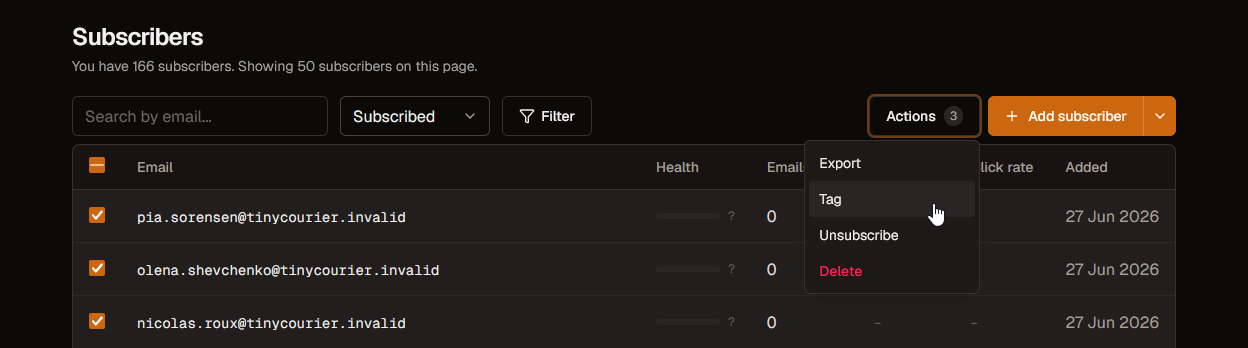
- Tag: apply a tag to everyone selected.
- Unsubscribe: mark them as opted out. They stay on your list but won’t receive campaigns.
- Export: download the selected people as a CSV.
- Delete: remove them entirely.
Unsubscribe vs delete vs forget
These sound similar but do different things:
- Unsubscribe: they stop getting emails but stay in your account (you keep their history). This is the usual choice.
- Delete: removes the subscriber from your list. Good for cleaning out dead weight.
- Forget: permanently erases all their personal data for privacy/GDPR requests. This can’t be undone. See Delete your data.
Keep your list healthy
Regularly removing people who never open or click protects your sender reputation and your inbox placement. TinyCourier even warns you about “dead” subscribers before a send. See Why emails bounce.