The simple home for MailerLite Classic refugees.
MailerLite Classic kept things simple, and now it has closed its free plans and new signups. The newer MailerLite is a bigger, heavier product. TinyCourier is the like-for-like simple replacement: bring your subscribers and groups across in minutes and keep sending the way you always have.
Free for up to 500 subscribers. Migration help included.
Per MailerLite’s own announcement that free plans and new account creation on Classic have ended. Read their notice
Why Classic users switch to TinyCourier
You didn’t want a bigger platform. You wanted the simple one to keep working. That’s what this is.
A real Classic importer
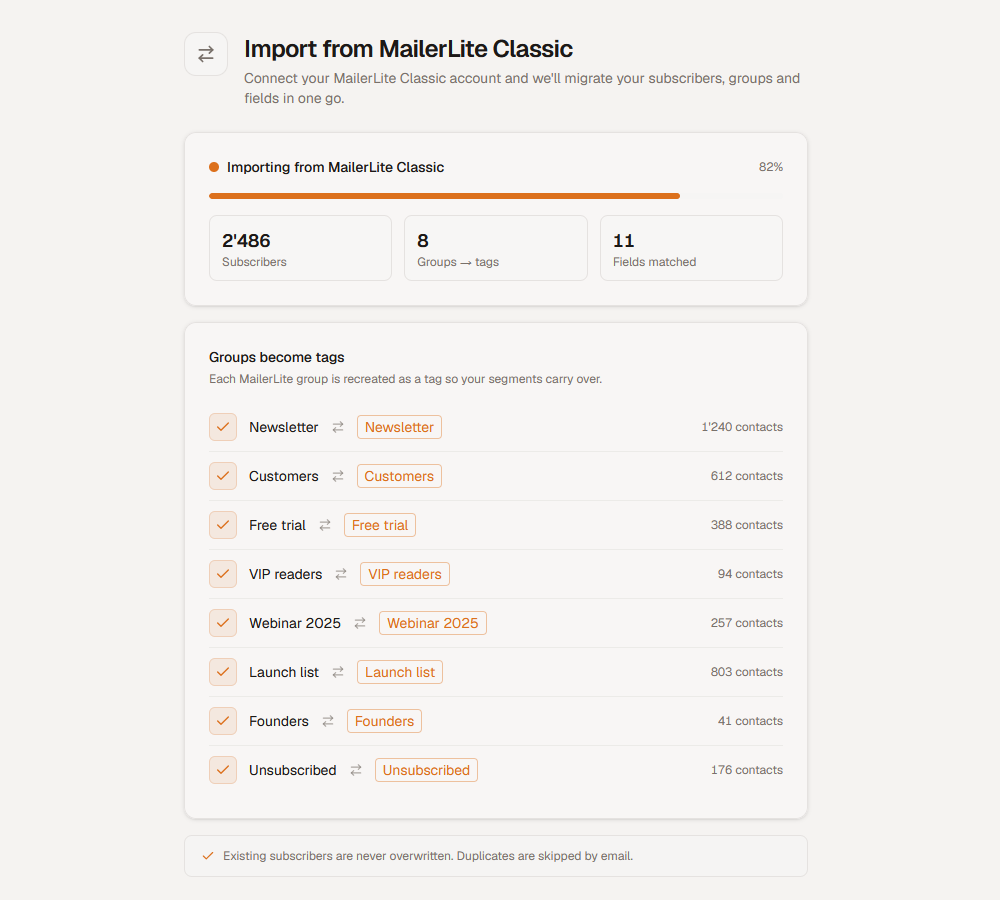
Paste in your Classic API key. Subscribers, groups (as tags) and suppressions come across cleanly, no CSV juggling.
Groups become tags, naturally
Your existing MailerLite Classic groups map straight to TinyCourier tags. Your segments still make sense.
Your unsubscribes keep working
Your suppression list is honoured on day one, with one-click unsubscribe to RFC standard. No one gets re-emailed by mistake.
Simple, the way Classic was
Automations stay simple, no maze to relearn, no upsell wall. The same write-and-send flow you already know.
Migrate in three steps
Most Classic users are fully moved over the same day. Stuck? Email us and we’ll do it with you.
- 1
Get your Classic API key
In MailerLite Classic, open Integrations and copy your API key. We’ll show you exactly where.
- 2
Paste it into our import tool
Open the TinyCourier import tool and add your API key. That’s all the setup it needs.
- 3
Click import, done
Hit import and we pull everything we can across, subscribers, groups and more, automatically. No CSV files, no manual upload.
MailerLite Classic → TinyCourier
A like-for-like move, not an upgrade you didn’t ask for.
| TinyCourier | The newer MailerLite | |
|---|---|---|
| Philosophy | Deliberately simple | Bigger, more features |
| Your groups | Import as tags | Migrate via their tool |
| Learning curve | Familiar, simple | New interface to learn |
| Pricing | All features, any size | Restructured tiers |
| Leave anytime | Full CSV/JSON export | Varies |
FAQ
Is this for MailerLite Classic or the new MailerLite?
What exactly can I import?
Will my readers notice the switch?
How long does migration take?
What does it cost after I move?
MailerLite Classic is leaving. Land here.
Bring your list and your groups. Keep the simplicity you signed up for. Start free in minutes.