How to import your subscribers
Bring your existing email contacts into TinyCourier from a CSV spreadsheet, copy-paste, or MailerLite, with a simple column-mapping walkthrough.
Already have a list of contacts? Let’s bring them in. You have three easy ways.
Option 1: Upload a spreadsheet (CSV)
This is the most common way.
- Go to Subscribers → Import → Upload CSV.
- Drag your
.csvfile onto the box, or click to browse. (Max 20 MB.) - Map your columns. We show you each column from your file and ask which TinyCourier field it belongs to, like matching “Email Address” to Email. We try to guess for you.
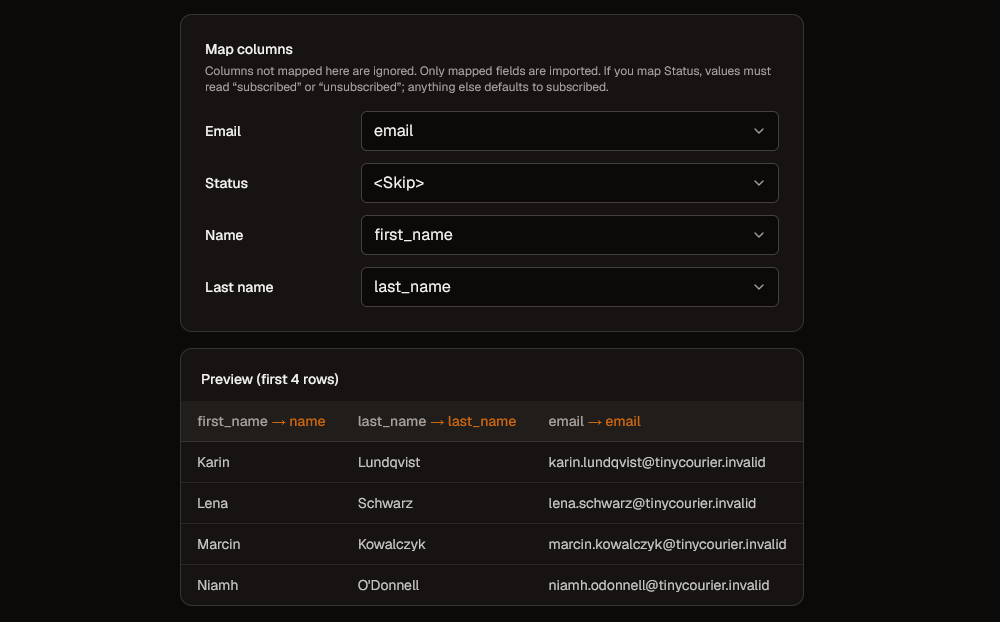
- Optionally apply tags so you can group these people later (for example, tag them “From old tool”).
- Click Start import. Done!
The only required field is Email. Everything else is optional. Columns you don’t map are simply ignored.
Getting your CSV ready
A CSV is just a spreadsheet saved in a simple format. In Excel or Google Sheets, choose File → Download / Save As → CSV. Make sure the first row has headers like email, name, city.
If your file has a Status column, use subscribed or unsubscribed. Anything else is treated as subscribed.
Option 2: Copy and paste
In a hurry or only have a handful of contacts? Go to Subscribers → Import → Paste and paste rows straight from your spreadsheet. It works just like the CSV upload, with the same column mapping.
Option 3: Bring them from MailerLite
Switching from MailerLite? Go to Subscribers → Import → MailerLite, paste your MailerLite API key, and we’ll pull your contacts over for you. Your MailerLite groups come across as tags.
After importing
Your contacts appear under Subscribers. From there you can search, filter, tag, and start sending.
A quick word on clean lists: only import people who actually signed up to hear from you. Importing bought or scraped lists leads to spam complaints, bounces, and a suspended account. When in doubt, leave it out.